1. Introduction
The WordPress ecosystem has exploded: from headless frameworks and full-site editing to thousands of page-builder kits on ThemeForest. In 2025, businesses still wrestle with the “custom vs. theme” choice because it represents a bigger
question:
Do you need optimization for today’s launch checklist or for tomorrow’s growth graph? This article
gives you a rigorous decision path—grounded in real-world data, not hype—to ensure you invest in the right foundation.
2. Defining the Options
-
- What Counts as Custom Today?
- Blank-Slate Builds – Designers craft each and every pixel,
developers code bespoke templates, functions, and Gutenberg blocks.
- Headless WordPress – WP for backend plus React/Vue front-end,
decoupling content from presentation for app-level performance.
- Bespoke Plugins &
Integrations – Custom APIs, membership logic, or e-commerce flows that marketplace plugins can’t
handle.
- Starter Frameworks – Sage, GeneratePress, or Underscores,
trimmed to essentials, then expanded precisely for your brand.
- What Are Pre-Built Themes?
- Marketplace Themes – One-size-fits-many packages with demo
imports and drag-and-drop styling.
Niche Kits – Vertical-specific themes for gyms, law firms, SaaS,
etc., bundling generic plugins and demo content.
Page-Builder Packs – Elementor/Beaver/Bricks template libraries
that promise “site in a day” simplicity.
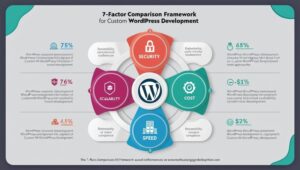
3. The 7-Factor Comparison Framework
- Cost & Up-Front Budget
- Custom: Higher initial spend (design, dev, QA) but tailoredcode
avoids license creep.
- Theme: <$100 for a license plus setup hours, yet paid add-ons
accumulate quickly and may equal—or exceed—custom over 2–3 years.
- Time-to-Launch
- Custom: 4–12 weeks is normal; more for advanced apps.
- Theme: Same-week launches possible—but expect rework once real
content collides with demo layouts.
- Design Flexibility & Brand Uniqueness
- Custom: Infinite. Your brand guidelines shape the grid,
typography, motion, and micro-interactions.
- Theme: You start with someone else’s brand DNA and wrestle to
“on-brand” it. Eventually you hit hard-coded walls.
- Performance, Core Web Vitals & SEO
- Custom: Only what you need ships. Clean code, lean CSS/JS, tuned
LCP and CLS; easier 90+ Lighthouse scores.
- Theme: Bundled sliders, icon fonts, and WYSIWYG overhead balloon
requests. You’ll often need extra optimization work.
- Scalability & Feature Roadmap
- Custom: Architecture anticipates new modules—membership,
multilingual, CRM sync—without plugin spaghetti.
- Theme: Each new feature risks plugin conflicts or design
mismatches. Refactor costs grow exponentially.
- Security, Updates & Technical Debt
- Custom: Fewer moving parts; dev team owns the code and patches.
- Theme: Relies on third-party vendors keeping theme + bundled
plugins secure. One abandoned add-on can expose the site.
- Ongoing Maintenance & Total Cost of Ownership
- Custom: Predictable—update WordPress core and your own codebase.
- Theme: Recurring license renewals, page-builder updates, extra
caching/CDN to compensate for bloat.
- Theme: Recurring license renewals, page-builder updates, extra caching/CDN to compensate for bloat.
Side-by-Side Snapshot
| Factor |
Custom Build |
Pre-Built Theme |
| Initial Cost |
$$$ |
$ |
| Launch Speed |
Medium |
Fast |
| Brand Uniqueness |
Complete |
Limited |
| Performance |
High |
Variable |
| Scalability |
Future-proof |
Constrained |
| Security |
Code-controlled |
Vendor-dependent |
| TCO (3 yrs) |
Stable |
Rising |
4. Decision Matrix—Which Path Fits Your Scenario?
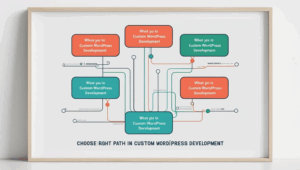
Answer “Yes” or “No” to each question.
If you collect 3+ “Yes” in a column, that’s your strongest fit.
| Question |
Custom |
Theme |
| Need unique UX to differentiate? |
Yes |
No |
| Plan >3 feature rollouts in 18 months? |
Yes |
No |
| Budget <$2 k & launch deadline next month? |
No |
Yes |
| Expect traffic >100 k monthly & tight SEO goals? |
Yes |
No |
| Comfortable relying on many third-party plugins? |
No |
Yes |
5. Hybrid & Middle-Ground Solutions
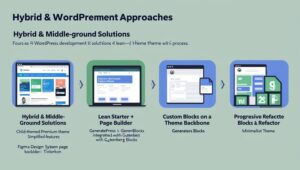
- Child-Theming a Premium Theme – Strip out features, rebuild templates, keep core update path.
- Lean Starter + Page Builder – Use GeneratePress + GenerateBlocks for near-custom performance with GUI convenience.
- Custom Blocks on a Theme Backbone – Design system lives in
Figma; Gutenberg blocks coded to match, layered onto a barebones theme.
- Progressive Refactor – Launch on a theme, collect revenue,
budget phase-2 custom rebuild without harming SEO.
6. Mini Case Studies
CASE 1 : High-Growth SaaS (Custom)
- Goal: Multi-tenant marketing site, gated resources, and product
docs.
- Build: Tailwind-powered custom theme, REST API to app, Algolia
search.
- Results: 96+ Core Web Vitals across global PoPs, 300 % traffic
growth, 30 % lower bounce vs. old Drupal site.
CASE 2 : Local Bakery (Theme)
- Goal: Affordable rebrand before holiday rush.
- Build: Niche Elementor kit, WooCommerce product grid, Stripe.
search.
- Results: ite live in 10 days, 2× online orders YoY. In year 2
they hit page-builder fatigue and began budgeting for custom refresh.
7. Common Myths Debunked
- “Custom always costs a fortune.” Modular development,
open-source libraries, and modern build chains have slashed custom overhead.
- “Themes are automatically slow.” A well-vetted lightweight theme(e.g., Blocksy, Astra) can hit 90s—but only if you resist plugin overload.
- “You can’t scale on a theme.” You can, but cost balloons:
more performance band-aids, more QA with each update. At some traffic threshold it’s cheaper to rebuild.
8. Conclusion & Recommendation
If your site is a short-term marketing experiment or you urgently need an online brochure, a pre-built theme is
the pragmatic choice—as long as you accept its shelf-life.
If your website is core to revenue, requires distinctive UX, or must integrate deeply with other
systems, invest in a custom build or a hybrid starter. The additional up-front spend is dwarfed by savings in
performance tuning, brand equity, and future features.


 Hardik Mehta